Microsoft said it improved Kinect on the Xbox One, and now a leaked setup manual indicates how little space it requires to operate. The PDF NeoGAF spotted
notes that a minimum 1.4 meters (just over 4.5-feet) between the user
and Microsoft's new do-all sensor is all that's required. For those of
us with cozy living quarters, this could be a bit more generous than the last one's recommended six to eight-foot
gap. We've reached out to Microsoft for an official comment and will
update this post if we hear back. Until then however, we're hoping that November 22nd will mark the end of us rearranging our living room to play the latest Dance Central.
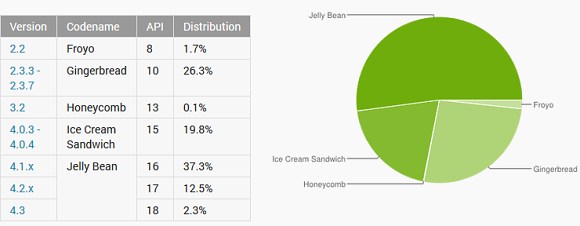
Google detailed the state of Android OS versions in October and it's
has shown that Jelly Bean has passed the 50% adoption rate mark. The
three JB releases have all gained ground at the expense of the outdated
versions.
2.3 Gingerbread still powers 26.3% of all droids, having fallen more than two percentage points since last month. It's still the second most popular single version after 4.1 Jelly Bean, though.
Android 4.0 Ice Cream Sandwich has lost 0.8 percent points of it
share and has fallen below the 20% . Honeycomb (3.2) is still at the
0.1% threshold.
As far as Jelly Bean is concerned - all three releases have improved
their shares. 4.1 rose by 0.8 points, 4.2 gained 1.9 points, while 4.3
added another 0.8 points. We expect to see some of the share of the
first two Jelly Bean releases transfer to 4.3 in the next few months as
more updates come in.
Android 4.4 KitKat was announced at the very last moment of the
survey, so it didn't make it to the charts. It probably won't have a
significant market share next month either as it will only power Nexus
devices by that point.
Sony does more than make Android devices, it’s a giant in the
entertainment business too – games, films and music. The company is
using this position to give some free goodies to owners of its Xperia
flagship products – the Xperia Z1 phone, Xperia Z Ultra phablet and the
Xperia Tablet Z slate.
Using the pre-installed Xperia Privilege app (also available for download at the Play Store), owners of these devices get access to 10 free games.
The games are Hungry Giraffe, Surge, Forevolution, Switch Galaxy,
Yu-Nama: The Puzzle, Tokyo Jungle Mobile, Rebel, Haunt the House:
Terrortown, Aqua Kitty – Milk Mine Defender and Ten By Eight. Remember
that Haunt the House: Terrortown is one of the games that supports DualShock 3 controllers.
In addition to the games, you’ll also be able to download 5 movies
including the Amazing Spider-Man and Elysium (as soon as it’s released
digitally). You also score a 60-day Music Unlimited trial for free.
Read more about the promotion and how it works here.
Four phones for you to consider
The smartphone market is a bustling scene right now and it can be
difficult to narrow down the best phones for you with so much choice on
offer.
Before you part with your cash you need to consider a few things. Ask yourself what you'll be using your smartphone phone.
Do
you want to take lots of pictures? Will you be surfing the web,
downloading apps or streaming video? Are you looking for a laptop/tablet
replacement that can fit in your pocket?
Ensure you make the right choice with our Smart Choice hub
To get you pointing in the right direction we've selected four top handsets to help you with your buying choice.
LG G2
LG
has been rather quiet on the smartphone scene in the past year and you
may have overlooked its handsets in recent times, but with the G2 it's
back with a bang.
The LG G2 offers up something different right
from the off - buttons on the back of the device. These consist of the
power/lock key and volume controls, leaving the sides smooth and
uninterrupted.
We found the power/lock key is a little tricky to
find at times, but LG has provided a workaround for this on the G2 - a
simple double tap of the screen will wake it or put it to sleep. It's so
easy, and after a while you'll wonder why no one else offers this.
Look
deeper at the LG G2 and you'll notice it's very well equipped with a
powerful 2.26GHz quad-core processor, stunning full HD 5.2-inch display
and a strong 13MP camera.
The LG G2 is the complete mobile
package, and while the plastic casing may not feel overly premium, the
sturdy design, lean design and impressive feature list more than makes
up for it.
Sony Xperia Z1
The
Sony Xperia Z1 is the latest in a line of top quality handsets to come
out of the Japanese firm and with a 20.7MP camera and waterproof body
it's one well worth considering.
Finished in a premium metal and
glass clad body the Xperia Z1 feels every inch a premium device and the
technology built in follows suit with a 2.2GHz quad-core processor,
5-inch full HD display and Android 4.2 Jelly Bean operating system.
As
well as the pleasing build quality and impressive line up of features
you can pick the Xperia Z1 up in a range of colours including black,
white and purple, to ensure your new smartphone matches your
personality.
The Sony Xperia Z1 manages to combine all these great
features to create a real powerhouse of a phone with a slick interface
and wealth of additional entertainment options.
The beautiful
screen coupled with Sony's multiple entertainment apps and 4G
connectivity means the Xperia Z1 is great for watching movies, listening
to music and playing games.
Nokia Lumia 1020
Smartphones
these days are becoming more and more alike, but with the Nokia Lumia
1020 we're greeted with a handset which comes at us from a completely
different direction.
From the front the Lumia 1020 looks similar
to a few of Nokia's other Windows Phone 8 handsets, flip it over however
and there's a whopping great 41MP camera slapped on its rear.
That
makes the Nokia Lumia 1020 the most powerful camera phone on the market
and it's the stand out candidate if you want a high powered snapper and
smartphone in one.
Windows Phone won't be everyone's cup of tea,
and there's a noticeable absence of a few top apps on the platform, but
it is particularly functional, intuitive and clean. If you're new to
smartphones the Lumia 1020 is very easy to use.
For the
professional photographers out there the Nokia Pro Cam app on the Lumia
1020 offers up a wealth of settings, allowing you to fine tune the
camera for the perfect shot.
Samsung Galaxy Note 3
Phones
are now fully fledged computers in our pockets, but with one obvious
drawback - the screen size. Well allow us to introduce you to the
Samsung Galaxy Note 3.
Currently the world's most powerful
smartphone with a 2.3GHz quad-core processor and 3GB RAM, the Note 3
will make mincemeat of anything you throw at it, be it a graphically
intensive game or a serious amount of multi-tasking.
It's 5.7-inch
full HD display is truly something to behold. Colours pop, text is
exceptionally well defined and video looks outstanding - although the
sheer size of the handset won't be for everyone.
The addition of
the S Pen stylus - housed within the Galaxy Note 3 chassis - allows you
to handwrite notes on the handset and it will even convert your scrawls
into text. Now that's clever.
The Samsung Galaxy Note 3 is stuffed
full of tricks and tech to keep even the most avid technology fan on
their toes. It's big, it's brash, and it's brilliant.
Roughly 24 hours after going official the LG Nexus 5 got the root treatment. The feat was accomplished by the renowned Android developer Chainfire.
At a quick glance, the root method appears easy to accomplish.
It requires booting the Nexus 5 in fastboot mode and connecting it to
your computer via a USB cable. Afterwards, executing a simple command is
required to root the device.
You can find detailed instructions about rooting the Nexus 5 below.
Be aware of the usual set of risks which the exercise carries. They
include losing your data or bricking the device altogether. Source
 Microsoft said it improved Kinect on the Xbox One, and now a leaked setup manual indicates how little space it requires to operate. The PDF NeoGAF spotted
notes that a minimum 1.4 meters (just over 4.5-feet) between the user
and Microsoft's new do-all sensor is all that's required. For those of
us with cozy living quarters, this could be a bit more generous than the last one's recommended six to eight-foot
gap. We've reached out to Microsoft for an official comment and will
update this post if we hear back. Until then however, we're hoping that November 22nd will mark the end of us rearranging our living room to play the latest Dance Central.
Microsoft said it improved Kinect on the Xbox One, and now a leaked setup manual indicates how little space it requires to operate. The PDF NeoGAF spotted
notes that a minimum 1.4 meters (just over 4.5-feet) between the user
and Microsoft's new do-all sensor is all that's required. For those of
us with cozy living quarters, this could be a bit more generous than the last one's recommended six to eight-foot
gap. We've reached out to Microsoft for an official comment and will
update this post if we hear back. Until then however, we're hoping that November 22nd will mark the end of us rearranging our living room to play the latest Dance Central.